GCash and Maya
Paying in and cashing out at S5 with GCash, Maya or a bank
Updated 2 November 2026
S5 Casino gcash and Maya still work in the S5 cashier for deposits and withdrawals, but S5 has not opened inside GCash GLife since 16 August 2025. Use the S5 website or app to manage your account, then choose a listed cashier route; check the current minimum, fees and processing estimate before confirming.
01 · Cashier
S5 Casino GCash and Maya: what still works
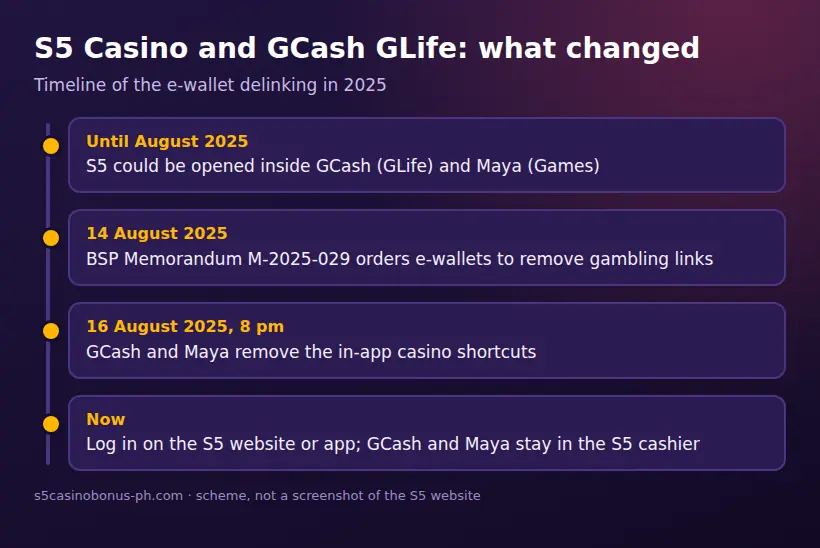
GCash and Maya remain payment methods in the S5 cashier, but the old GCash GLife route is no longer a way to open S5. BSP Memorandum M-2025-029, dated 14 August 2025, ordered e-wallets to remove gambling links. GCash and Maya removed those links on 16 August 2025 at 8 pm. This affects access through the wallet apps, not the listed payment options inside S5.
Open S5 through the S5 website or app, sign in with your mobile number or username and password, or use OTP if available. If you need help with account access, see the S5 login guide. The casino account, the game, the app or APK, and the mobile website are separate things: removing the GLife shortcut did not remove S5’s cashier methods.
The BSP has also published an exposure draft circular about online gambling payment services. Proposals include limits linked to a wallet’s average daily balance and a 24-hour cool-off. It is a draft, not a final rule, so do not treat those proposals as current S5 cashier limits. Check the cashier in your account before sending money.
02 · Cashier
S5 payment methods and published minimums
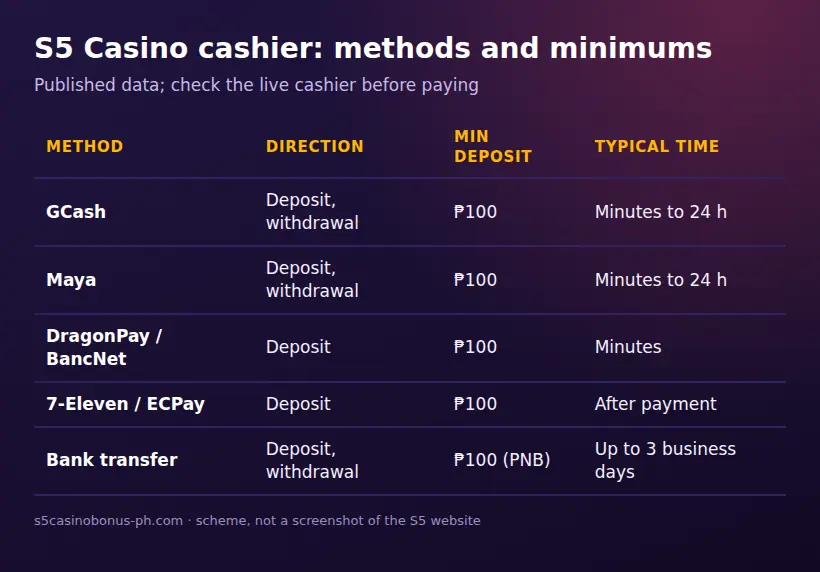
The table summarises published cashier information. Minimums and processing estimates can change, so the live cashier in your account takes precedence. A dash means the supplied published information does not give a specific figure for that field.
| Method | Direction | Minimum deposit | Typical time | KYC needed |
|---|---|---|---|---|
| GCash | Deposit and withdrawal | ₱100 | E-wallet withdrawals: about 15 minutes to 24 hours; usually processed the same day | Complete account verification; withdrawal account must be in your name |
| Maya | Deposit and withdrawal | ₱100 | E-wallet withdrawals: about 15 minutes to 24 hours; usually processed the same day | Complete account verification; withdrawal account must be in your name |
| QRPh | Deposit; check cashier for available withdrawal route | Cashier display | Check the cashier | Verification may be required for account or withdrawal checks |
| DragonPay, BancNet, ECPay, 7-Eleven (7 Connect) | Deposit | ₱100 | Not published; follow the cashier instructions | Verification may be required for account or withdrawal checks |
| PNB | Deposit | ₱100 | Bank processing varies; some bank routes take up to 3 business days for withdrawals | Complete account verification; use an account in your name for withdrawals |
| BDO, BPI, RCBC, UnionBank and other local banks | Deposit; bank transfer withdrawals are listed | Check cashier | Some bank withdrawals take up to 3 business days | Complete account verification; use an account in your name |
| S5 Shop e-voucher | Deposit using an S5 e-voucher | Check the cashier | Follow the voucher instructions | Account checks may apply |
S5 lists GCash, Maya, QRPh, DragonPay, 7-Eleven, ECPay, BancNet, Lazada vouchers, PNB, BDO, BPI, RCBC, UnionBank and other local banks for deposits. The published minimum is ₱100 for GCash, Maya, DragonPay, BancNet, 7-Eleven, ECPay and PNB. The supplied cashier information does not give a minimum for every route, including QRPh, so confirm the amount shown before paying.
03 · Cashier
How to deposit with GCash or Maya
You can deposit from GCash or Maya through the S5 cashier. You need an active S5 account and should be at least 21, in line with PAGCOR’s minimum age rule. Check that the payment method and amount appear in your own cashier before proceeding.
- Open the S5 website or app and sign in. The old GLife shortcut will not open S5; use the S5 GCash guide for more on the change.
- Open the cashier or deposit area and select GCash or Maya.
- Enter your deposit amount. The published minimum for either wallet is ₱100, but the cashier will show the current terms.
- Follow the payment instructions displayed by S5. Review the amount and recipient details in your wallet before confirming.
- Return to the S5 cashier and check whether the deposit is recorded. Keep the transaction details in case you need to contact support.
Do not pay using a credit card or cryptocurrency. PAGCOR rules do not allow credit cards or crypto for betting, and S5 does not work with crypto. Deposit fees are not specified in the supplied published figures; check the wallet and cashier screens for any charge before confirming. If a payment is deducted but your S5 balance does not update, do not repeat it immediately. Save the transaction details and contact S5 support through live chat, cs@s5support.com or the contact form at s5.com/contact-us.
04 · Cashier
QRPh, bank, 7-Eleven and S5 Shop deposits
Other listed deposit options include QRPh, DragonPay, BancNet, 7-Eleven through 7 Connect, ECPay, Lazada vouchers and local banks. The published ₱100 minimum applies to DragonPay, BancNet, 7-Eleven and ECPay, as well as GCash, Maya and PNB. For QRPh, Lazada vouchers and other routes without a stated minimum, use the amount displayed in the cashier rather than assuming the same threshold.
- In the S5 cashier, select the route you intend to use and enter an amount accepted on that screen.
- For QRPh or bank payments, follow the cashier’s payment instructions and verify the details before sending funds. For 7-Eleven, use the displayed 7 Connect instructions; for DragonPay or ECPay, follow the payment flow shown.
- Keep the payment confirmation, then return to S5 to check your balance.
- For an S5 e-voucher, obtain an S5 voucher through S5 Shop, the app by Rush Technologies on Google Play, then follow the cashier instructions to use it. Check the voucher and cashier terms before buying or redeeming it.
Deposit processing times and fees for these routes are not stated in the supplied cashier figures. Some bank routes may have bank processing fees, so review the amount and any charge before completing a payment. If the cashier route, minimum or instructions differ from what you expected, stop and confirm the current details with S5 support instead of guessing.
05 · Cashier
S5 Casino withdrawal: steps and timing
S5 lists withdrawals to e-wallets and by bank transfer. Withdraw only to a GCash, Maya or bank account in your own name, matching the name on your S5 account and ID. Complete verification using a valid government ID and selfie; for higher withdrawals, S5 may request a video KYC call. You must complete that call within 72 hours or the withdrawal can be cancelled. Any bonus funds must also finish their wagering requirements before withdrawal.
- Sign in to S5 and open the withdrawal section of the cashier.
- Select an available e-wallet or bank route. Enter an account that is registered in your own name and matches your verified S5 details.
- Enter the amount and review the destination, processing information and any displayed fee before submitting the request.
- Complete any KYC checks S5 requests. If asked to attend a video KYC call, do so within 72 hours.
- Check the withdrawal status in your account. If it is delayed beyond the displayed estimate, contact support with the request details.
Published processing guidance says withdrawals are usually processed the same day. E-wallets can take about 15 minutes to 24 hours, while some bank routes can take up to 3 business days. These are typical ranges, not a promise of a particular arrival time. No per-day or per-month withdrawal cap is published in the supplied information. Some bank routes may have processing fees; check the cashier for the route you select.
A player filed a complaint about e-wallet collection and withdrawals on the Philippine FOI portal. That report is a reason to verify your account and payment details early, not proof that every withdrawal will have a problem. Keep your S5 account name, ID and withdrawal account consistent, and save transaction records.
06 · Cashier
Why an S5 withdrawal may be delayed
The most common listed checks relate to identity, account ownership, wagering and any requested video verification. Check these points before submitting a request rather than waiting until a withdrawal is already pending.
| Issue | What to check or do |
|---|---|
| KYC is incomplete | Submit a valid government ID and selfie, then wait for the S5 text confirmation. Contact support if the account still shows a verification issue. |
| Account names do not match | Use a withdrawal wallet or bank account in your own name, with details matching your S5 account and ID. Do not use another person’s account. |
| Bonus wagering is unfinished | Review the bonus terms in your account. Bonus funds must complete wagering before withdrawal. Current offers and conditions are shown on the Promotions page guide. |
| Video KYC request is missed | Arrange and complete the requested call within 72 hours. If you miss that window, the withdrawal can be cancelled. |
| Bank processing takes longer | Allow up to 3 business days for some bank routes, then check the status and contact support if it remains unresolved. |
| GLife shortcut or login error | GLife access ended on 16 August 2025. Open S5 through its website or app, and check the domain and account details if login fails. |
S5 support is available through 24/7 live chat on the site and app, cs@s5support.com, or s5.com/contact-us. Never share an SMS OTP or password with someone claiming to fix a payment. S5 login issues can also stem from a fake-copy domain, access from outside the Philippines, a VPN or an unverified account; use a domain listed by PAGCOR and the S5 account recovery route if needed.
07 · Cashier
Payment rules and account checks
S5 is intended for players in the Philippines, and its website shows an access-restricted page outside the country. The minimum age is 21. PAGCOR rules also bar government officials, GOCC employees and AFP/PNP members from playing. The account is for one person, and the name used for withdrawals must match the account and ID.
Use Philippine pesos, the currency supported by S5. Credit cards and cryptocurrency are not supported for betting under the stated rules; S5 does not work with crypto. Payment options, minimums, fees and processing estimates are cashier information that can change, so check them immediately before a transaction. For account registration and verification details, see the S5 sign-up guide; for app access, see the S5 app guide.
FAQ
Questions about S5 Casino
Does S5 Casino GCash still work?
Yes, GCash remains a deposit and withdrawal method in the S5 cashier, with a published ₱100 minimum deposit. S5 no longer opens inside GCash GLife, so use the S5 website or app.
Does S5 Casino Maya still work?
Yes, Maya is still listed in the S5 cashier for deposits and withdrawals, with a published ₱100 minimum deposit. Check the live cashier for current instructions, fees and timing.
Can I use S5 Casino GLife to log in?
No, S5 cannot be opened inside GCash GLife since 16 August 2025. Log in through the S5 website or app instead.
How to withdraw in S5 Casino?
Choose an available e-wallet or bank transfer in the S5 cashier and withdraw only to an account in your own name. Complete KYC and any bonus wagering first; a requested video KYC call must be completed within 72 hours.
What is the S5 Casino minimum deposit and withdrawal time?
The published minimum is ₱100 for GCash, Maya, DragonPay, BancNet, 7-Eleven, ECPay and PNB; other routes may show a different cashier amount. E-wallet withdrawals usually take about 15 minutes to 24 hours, while some bank routes take up to 3 business days.