Sign Up
How to complete your S5 casino sign up in the Philippines
Updated 2 November 2026
S5 Casino sign up is done on the S5 website or app with a Philippine mobile number, an SMS OTP and a password; complete KYC before withdrawals. You must be 21 or older and in the Philippines. Prepare your own valid ID and a payment account in your name, and check the account’s Promotions page for current offers.
01 · Sign up
Who can register with S5 Casino
You can register with S5 if you are at least 21, are in the Philippines and are not in a group barred from playing under PAGCOR rules. Government officials, GOCC employees and AFP or PNP members are not eligible. S5 is intended for players in the Philippines; access from outside the country may be restricted.
S5 Casino, S5 Arena and S5.com are brands operated by Glowlight Corporation, a company registered in the Philippines. PAGCOR’s published list dated 20 October 2026 names Glowlight Corporation and S5 Arena, including S5 Casino and S5.com. This guide is independent of the operator. For more context about the site and its operator, see our about page.
Before you start, check that you are using an S5 domain listed by PAGCOR, such as www.s5.com or s5casino.ph. Other domains using the S5 name are not on that list. Do not try to get around an access restriction with a VPN; if you are outside the Philippines, registration and access may not be available.
Account
Mobile number, SMS OTP and a password on the S5 website or app. Sign-up guide.
Verification
Government ID and selfie. Video KYC may be asked for larger withdrawals, within 72 hours.
Cashier
GCash, Maya, QRPh, banks or 7-Eleven from ₱100. Payment guide.
02 · Sign up
What to prepare for S5 casino registration
Have your own Philippine mobile number, a valid government ID and a selfie ready. You will need the phone to receive the SMS one-time password (OTP), and the ID and selfie for KYC verification. Use details that match your ID, because the account name must match the ID and the e-wallet or bank account you use for withdrawals.
Prepare an e-wallet or bank account in your own name if you expect to withdraw. GCash, Maya and bank transfer are among the payment options listed in the S5 cashier; available methods and terms can change, so check your account’s cashier. Do not register using another person’s payment account and assume you can withdraw to it later.
The registration process is for one account per person. If you already have an S5 account, use the existing credentials or the S5 login guide rather than opening a second account. Keep your OTP private and make sure you can access the mobile number attached to the account.
03 · Sign up
S5 casino sign up: step by step
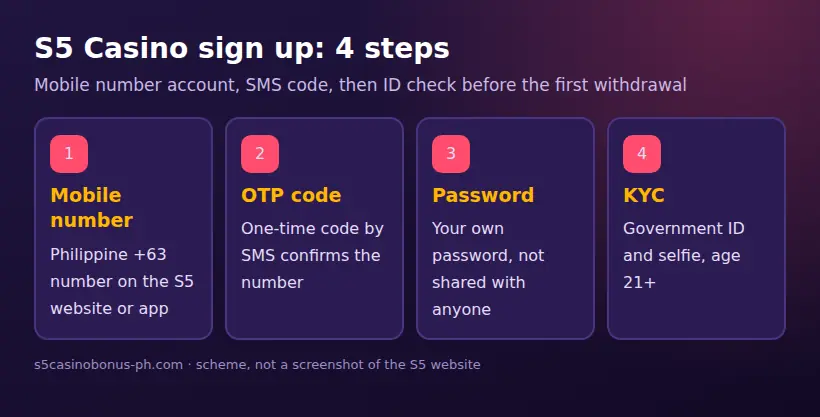
You can create an account on the S5 website or app using a Philippine mobile number. The SMS OTP confirms the number, and you set a password as part of registration.
- Open the S5 website or app while in the Philippines. Confirm the domain before entering personal details; avoid links or downloads from unfamiliar pages.
- Choose the sign-up or registration option and enter your Philippine mobile number as requested.
- Request the SMS OTP, then enter the code sent to that number. Never give the OTP to another person, even if they claim to be helping with registration.
- Set a password and complete the requested account details. Enter your name as it appears on your valid government ID.
- Submit the registration and continue to identity verification. Prepare your ID and selfie for KYC rather than waiting until you need to withdraw.
- Check that you can return to the account using your mobile number or username and password. The login process may also offer OTP access; if you forget the password, the reset process uses SMS.
After those steps, you have a registered account, but registration is not the same as completed verification. KYC is needed for withdrawals, and the account and payment details must be in your own name. If you need more device information, our S5 app guide explains the distinction between the app and the mobile website. The mobile site works in Chrome and Safari without installing an app.
04 · Sign up
KYC after S5 Casino registration
KYC requires a valid government ID and a selfie. Submit the details requested in the account and wait for the text confirmation after successful verification. Make sure the account name matches the ID and the e-wallet or bank account you plan to use for withdrawals; S5 requires withdrawals to go to an account in your own name.
For higher withdrawals, S5 may request a video KYC call. If this request is made, complete the call within 72 hours; otherwise, the withdrawal can be cancelled. This is a separate verification step, so do not assume that uploading an ID and selfie means a later video request can be ignored.
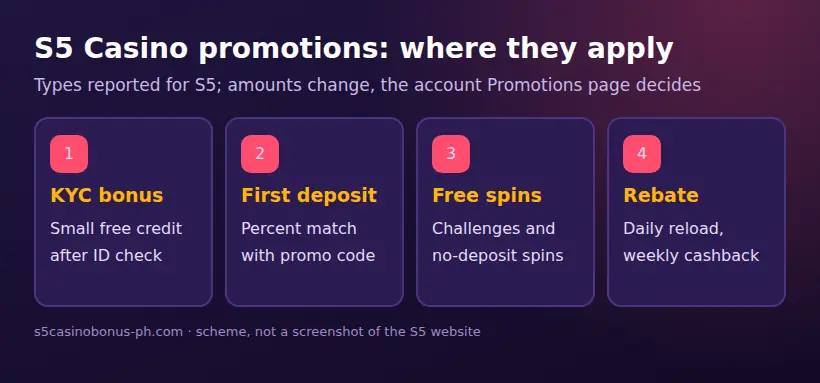
A small KYC bonus, described as a “free 10” type offer, has been published in the range of ₱10 to ₱55 after verification. Treat this as a conditional promotion, not a registration entitlement: check whether it appears in your own account and read its current terms. Promotions change, and only offers displayed in your account’s Promotions page are valid for you.
If KYC is still pending, review the details you submitted and check for a confirmation text. Do not submit someone else’s ID or create another account to get around a verification issue. If you need assistance, contact S5 through the 24/7 live chat on its website or app, email cs@s5support.com, or the contact form at s5.com/contact-us.
05 · Sign up
Promo codes and S5 casino referral offers
Enter a first-deposit promo code only when an offer shown in your S5 account asks for one, and do so during the deposit process. The Promotions page in your account is the place to confirm eligibility, the code, deposit conditions and any wagering requirement before you accept an offer. You can also read our S5 bonus guide for more information about how to check promotions.
Published offers have changed over time. A 2026 promotion mentioned a 20% first-deposit bonus up to ₱550. A 2025 first-deposit promotion listed tiers of 30%, 50%, 75% and 150%, with a maximum of ₱2,250; it was for new players, required a promo code at deposit and had wagering of 20 times the bonus on slots. Those are published historical terms, not a promise that the same offer or codes are currently available. The offer displayed in your own account takes precedence.
Referral offers have been published at about ₱200 when an invited friend registers and meets the conditions. The amount and qualification rules can change, so check the referral section in your account before sharing a link or expecting a reward. A referral is not a substitute for the invited person’s own eligibility, KYC or one-account-per-person rule.
Do not trust third-party pages offering “free 100”, “free 20 APK”, “free 51” or “free 15 spin” codes unless the same offer appears in S5’s Promotions page. Never install an unknown APK or send an OTP to claim a supposed bonus. For payment methods and wallet details, see our GCash guide; GCash and Maya can be used inside the S5 cashier, but they no longer provide access to S5 through GLife or Maya Games.
06 · Sign up
Common S5 registration errors
If registration or verification does not proceed, check the phone number, account status, identity details and the page you are using before trying again. The table gives practical checks for common problems; it does not override instructions shown in your S5 account.
| Problem | Possible reason | What to check or do |
|---|---|---|
| SMS OTP does not arrive | The number was entered incorrectly, or the phone cannot receive the message | Confirm the Philippine mobile number and that the phone can receive SMS. Request or enter a code only through the S5 registration flow. |
| The number is already associated with an account | S5 allows one account per person | Use the existing account and password reset by SMS if needed. Do not create another account to bypass the issue. |
| KYC details do not match | The account name differs from the ID, or the submitted details need correction | Compare the account details with the valid government ID and follow the account’s verification instructions. Do not use borrowed documents. |
| Withdrawal account is rejected | The e-wallet or bank account is not in the player’s name | Use an account in your own name that matches the S5 account and ID. |
| The page is unavailable or access is restricted | You may be outside the Philippines or using a domain not listed for S5 | Check your location and the domain. Do not use a VPN to evade an access restriction or enter details on an unfamiliar copy site. |
| A video KYC request is pending | S5 requested extra verification for a higher withdrawal | Complete the video KYC call within 72 hours to avoid possible cancellation of the withdrawal. |
If your issue concerns login rather than registration, the login guide covers password reset and common access problems. The old GLife shortcut no longer opens S5; since GCash and Maya removed gambling links on 16 August 2025, use the S5 website or app to access your account.
07 · Sign up
What not to do when you create an S5 account
Use your own identity and payment details throughout registration, KYC and withdrawals. Borrowed IDs, another person’s GCash or bank account, and shared OTPs can create verification and withdrawal problems. S5’s one-account-per-person rule also means you should not open another account to fix a problem with an existing one.
Do not share a password or OTP with anyone. S5 confirms a mobile number by SMS OTP, and giving that code to somebody else can expose access to your account. If a page, message or APK asks you to send an OTP in exchange for free credit, do not follow the request; offers should be checked in the Promotions page in your own account.
Use the S5 website or app to register. The mobile website can be used in Chrome or Safari without an app. The iOS app is listed as “S5” by GLOWLIGHT CORPORATION; Android users should only download the APK from the S5 website’s download section on a domain listed by PAGCOR. An app or APK is separate from the casino operator and its games, and a game is separate from both the app and the mobile website.
08 · Sign up
After sign up: cashier and responsible gaming settings
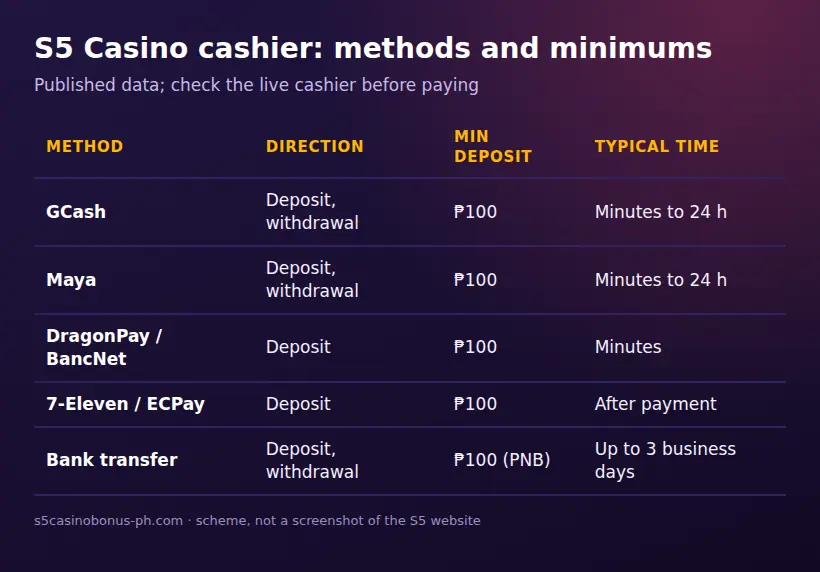
Once registered, check KYC status and the cashier before depositing. The published minimum deposit is ₱100 for GCash, Maya, DragonPay, BancNet, 7-Eleven, ECPay and PNB, but methods and minimums can change. Confirm the current amount in your account’s cashier before making a payment. S5 uses Philippine pesos; PAGCOR rules do not allow credit cards or crypto for betting, and S5 does not work with crypto.
Set personal deposit limits and review the responsible gaming tools before you play. S5 lists self-exclusion, deposit limits, reminders and educational materials. These settings can help you manage your own use, but they do not change the 21+ requirement or remove the need to complete KYC. See our responsible gaming guide and PAGCOR’s responsible gaming information. The PAGCOR OSEA self-exclusion portal and the National Problem Gambling Helpline are additional resources.
If you choose to deposit, use only the cashier options shown in your account and keep the payment account in your name. Bonus funds may need to meet wagering conditions before withdrawal; read the terms of the specific offer before accepting it. The published cashier data is not a promise of processing time or a fixed payment route, so use the information displayed at the time of your transaction.
FAQ
Questions about S5 Casino
How do I create an S5 casino account?
Register on the S5 website or app with a Philippine mobile number, confirm it using the SMS OTP and set a password. Then complete KYC with a valid government ID and selfie before withdrawing.
What are the requirements for S5 casino registration?
You must be at least 21, be in the Philippines and not be a government official, GOCC employee or AFP/PNP member barred under PAGCOR rules. Have your own Philippine mobile number, valid government ID, selfie and an e-wallet or bank account in your name ready.
Why is S5 asking for video KYC?
S5 may ask for a video KYC call for higher withdrawals. Complete it within 72 hours of the request, or the withdrawal can be cancelled.
Where do I enter an S5 casino promo code?
Enter a code during the deposit process only when the offer in your account requests one. Check the Promotions page for current eligibility, wagering terms and whether the offer is still available.
How much is the S5 casino referral reward?
A referral reward of about ₱200 has been published when an invited friend registers and meets the conditions. Check the referral terms in your account because the amount and requirements can change.